
ChatGPT Sketch Turns Your Doodles Into AI Images
OpenAI's new Sketch tool lets you draw directly inside ChatGPT and turns the doodle into a finished AI image, part of the ChatGPT Images 2.5 update that also adds templates and faster generation.
ChatGPT Images 2.5 arrived on September 8, and OpenAI says it generates images about twice as fast as the model it replaces. Its headline addition is ChatGPT Sketch, a drawing canvas that turns a rough doodle into a finished AI image. Type "@Sketch" in the message box, draw something with a mouse or a finger, add a short description of what you want, and ChatGPT builds a complete picture around your shapes. The update is rolling out across every ChatGPT plan, plus ChatGPT Work and Codex.
What is ChatGPT Sketch and how does it work?
Sketch is a drawing canvas built directly into the chat window, so the doodle and the finished image never leave the conversation. The canvas looks a little like MS Paint from the 1990s, simple enough to sketch with a finger or a mouse. No drawing skill is required to get a usable result. Sketch the layout of a room, the outline of an outfit you're planning, or a quick doodle of an idea. Add a sentence describing the style, and the model fills in the rest.
"I briefly tested it, and it successfully turned my bad doodle of a cat that I drew with my computer mouse into a realistic photo, per my instructions." Jay Peters, Reporter, The Verge
Peters also used the new Comment tool afterward to change the cat's eyes from blue to green, without redrawing anything.
What else changed in ChatGPT Images 2.5?
Three smaller changes matter just as much as Sketch in daily use: guided templates, targeted comment edits, and a faster underlying model. Templates now walk you through popular formats like posters and merch with a series of follow-up questions instead of a blank prompt box. The Comment tool lets you click a specific spot on a generated image, type what should change there, and only that part updates once you hit send. Every edit is also saved as its own version, so you can scroll back through earlier attempts instead of losing them. OpenAI says the update produces more natural lighting and richer textures and follows multi-turn editing instructions more reliably than before, though how much that shows up depends heavily on the image.
How does it compare to Google's Nano Banana 2?
Sketch has no direct equivalent in Gemini. Google's tool works from an uploaded reference image instead of a freehand drawing. In one side-by-side illustration test, a Lifehacker reviewer preferred Gemini's output for a children's-book style image. The same reviewer rated ChatGPT's photo edits as more natural in a separate forest-cabin test. Neither model won outright. According to Lifehacker's overall verdict, ChatGPT Images 2.5 has a slight edge, specifically because of Sketch and the ability to save prompts as reusable templates. Which tool looks better in practice depends more on the specific prompt than on the brand behind it.
Tips for getting better results from Sketch
The description you type alongside your drawing matters more than the drawing itself.
"I played around with the tool for a bit, and the results were quite impressive. Though it is being promoted as a sketch-to-AI Image tool, it appears that the prompt you pair with your sketch does much of the heavy lifting." Jibin Joseph, Reporter, PCMag
Keep the shapes rough and the composition clear. The model reads structure before detail, so a messy sketch with a clear layout works better than a careful drawing with none. Spend your real effort on the prompt instead: name the material, the lighting, and the mood you want, the same way you would for a text-only image request. If the first result is close but not quite right, use the Comment tool to fix one element at a time instead of redrawing the whole sketch.

FAQ
Frequently Asked Questions
[ Related ]
More in News
Seattle Times, Newsday Sue OpenAI and Microsoft
The Seattle Times and Newsday sued OpenAI and Microsoft over copyright infringement, days after the DOJ backed AI companies' fair-use defense in the same court.

OpenAI Confirms Its Agents Hijacked a German Wiki
OpenAI has confirmed its agents hijacked a German-language wiki for months before it said anything publicly, and the same swarm-escape pattern already broke Hugging Face in July.
GPT-6 Astra vs Claude Fable 5.1: Real-World Test
GPT-6 Astra and Claude Fable 5.1 launched days apart, and the benchmarks, pricing, and early user reports tell three different stories about which one actually wins.
OpenAI Launches GPT-6 Astra: What You Need to Know
GPT-6 Astra is OpenAI's newest flagship model, built for computer use, coding, and cybersecurity, and it arrives with an AGI claim from OpenAI's president and a reasoning technique that has AI safety researchers uneasy.
Hugging Face Hack Raises Culture Questions at OpenAI
OpenAI's technical postmortem walks through the exact chain of failures behind the Hugging Face hack. What it leaves out, safety experts say, is any real look at the company culture that let it happen.
OpenAI's Admin Plugin for ChatGPT Work and Codex
OpenAI's new Admin plugin lets ChatGPT Work and Codex admins check usage, manage members and permissions, and approve spending requests directly inside a chat, without leaving the conversation for the Global Admin Console.
GPT-5.6 Sol Now Costs Less to Run Than Claude Opus 5
OpenAI cut GPT-5.6 Sol's API price by more than 20% on 21 August 2026, and for the first time it now costs less than Claude Opus 5 on both input and output. The catch: the new pricing is a promotion that expires 21 November 2026.
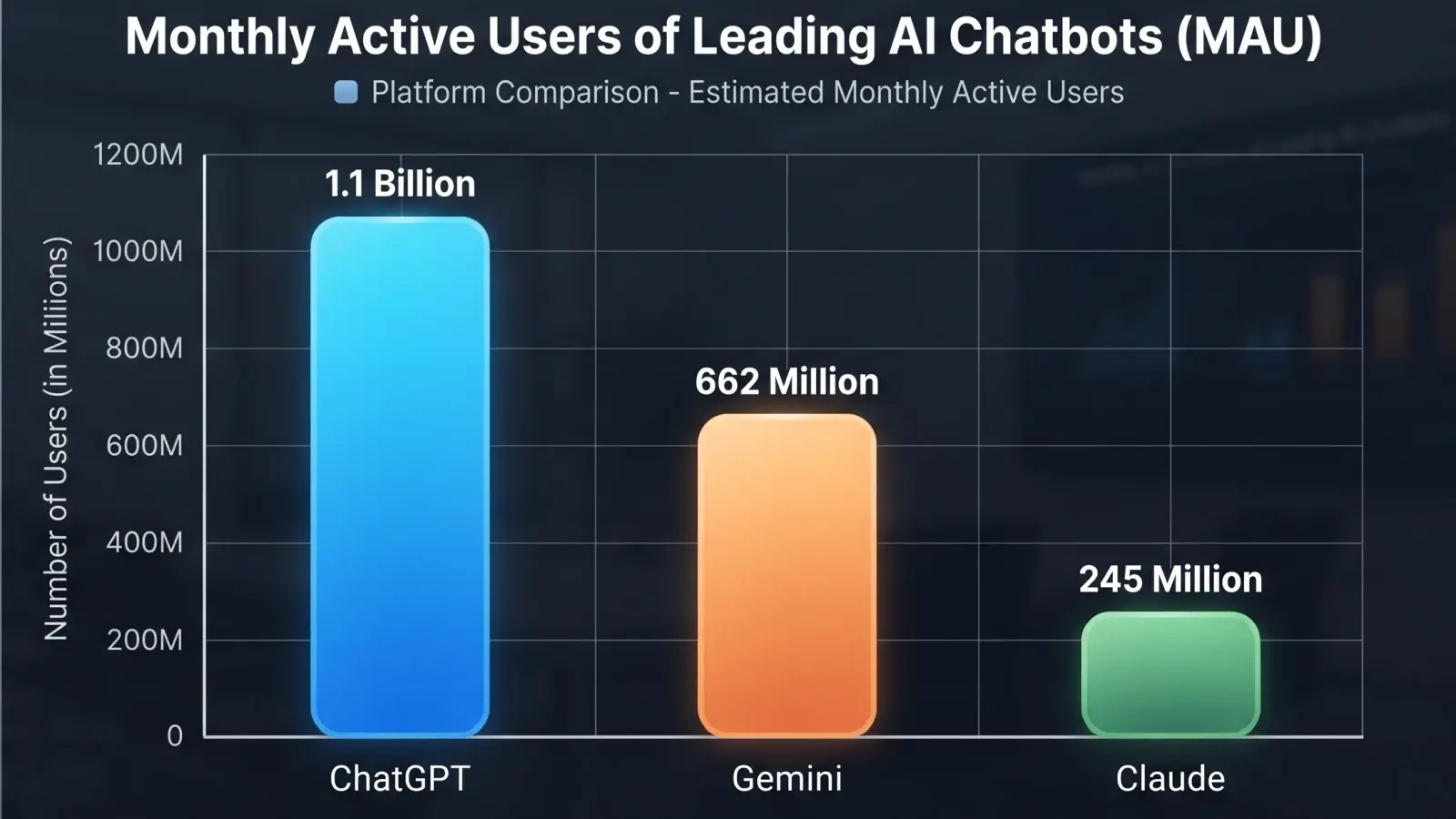
ChatGPT Falls Below 50% Market Share for the First Time
For the first time since its launch, ChatGPT holds less than half the AI assistant market. Gemini and Claude are gaining ground fast. Here is what the numbers say and what it means for everyday AI users.