OpenAI's Admin Plugin for ChatGPT Work and Codex
OpenAI's new Admin plugin lets ChatGPT Work and Codex admins check usage, manage members and permissions, and approve spending requests directly inside a chat, without leaving the conversation for the Global Admin Console.
OpenAI launched the Admin plugin for ChatGPT Work and Codex on August 25, 2026, giving workspace admins a way to check usage, manage members and permissions, and adjust spending limits from inside one chat instead of switching between the Global Admin Console, reports, and settings pages. The plugin runs supported admin actions directly from a conversation: ask a question, review the details, make an authorized change, and confirm it happened. OpenAI built it because managing a growing workspace usually means bouncing between analytics, settings, and reports just to understand and fix one issue, which slows down routine IT work.
What does the Admin plugin actually do?
The Admin plugin covers four core admin workflows inside ChatGPT Work and Codex. Admins can review activity and credit usage to see where enablement would help and which members or groups are nearing their credit limits. They can add or remove members, update groups, and complete onboarding and offboarding without leaving the chat. They can review effective permissions, diagnose access issues, and control feature or model access by role or group. And they can adjust usage limits for members, groups, and workspaces, then approve or deny spending requests with the surrounding context already pulled in.
That last piece matters more than it sounds: enterprise AI spend is becoming its own discipline, not a footnote. According to Biswajeet Mahapatra, principal analyst at Forrester, usage visibility and spend controls are becoming foundational because they connect how much AI a team uses to what that use is actually worth.
Can the Admin plugin automate recurring admin work?
Yes. Beyond answering questions on demand, the Admin plugin can run recurring checks and handle high-volume requests without custom engineering. It can route pending usage requests to Slack or Microsoft Teams, so authorized reviewers approve or deny them inside tools they already use. It can also monitor feature-access requests and automatically grant the ones that meet predefined criteria, while sending anything outside those rules to a human for review.
That's the difference between a chatbot that answers admin questions and a system that reduces the admin workload. Manual monitoring and one-off approvals are exactly the repetitive work that slows an IT team down, and automating the predictable slice of it frees admins to spend their judgment on the exceptions that actually need it.
Does the Admin plugin give admins new access?
No. The Admin plugin works entirely within each user's existing role and permissions, and it does not grant broader access than an admin already has. Behind every request, the plugin maps the admin's instructions to a supported read or write action and returns a structured result, rather than acting as an unrestricted control layer. That is a meaningfully different approach than Gemini's default access to Google Workspace data, where broad access is switched on unless an admin manually turns it off.
For each change made through the plugin, admins can see exactly what they requested, whether it completed, and what changed as a result. Actions with broader impact still require review before they're applied, so the plugin adds speed without quietly expanding what any one admin can touch.
How is OpenAI's own IT team using it?
OpenAI's Global IT team uses the Admin plugin as the first step in workspace administration, turning what used to be a multi-step reporting task into a single question. "The value is far beyond faster reporting. The Admin plugin connects the question to the next supported action, whether that is checking someone's effective permissions, updating a group, changing a usage limit, or reviewing a spending request," said Kunal Malik, Head of Global IT at OpenAI. "It gives admins a faster way to understand what is happening and take action, while preserving the same permissions and controls we already use."
That shift extends beyond IT reporting. It lines up with OpenAI's wider push into enterprise partnerships, aimed at getting more businesses running AI-driven workflows. A ChatGPT Work agent already handles employee IT requests in Slack. It triages tickets, checks policy, and escalates anything it can't resolve, and OpenAI reports it has resolved about 45% of ticket volume. The same shift turned raw support-ticket data into operational health dashboards. OpenAI says that helped clear a backlog and let the team plan for demand instead of reacting to it, even as support volume roughly doubled.
How is the Admin plugin different from the Global Admin Console?
The Admin plugin is a conversational layer on top of admin actions, not a replacement for OpenAI's existing Global Admin Console. The console already handles the heavier tenant-level work, including identity, SSO, billing, and cross-workspace analytics for eligible ChatGPT Business, Enterprise, and Edu organizations. That's structural, account-level configuration.
The Admin plugin sits closer to the day-to-day: the individual member question, the one-off permission check, the single spending request that needs a decision right now. Admins will likely keep using the console for setup and governance and the plugin for the routine requests that used to mean opening it in the first place.
How does this compare to Microsoft's approach to agent governance?
OpenAI and Microsoft are solving a similar problem from opposite directions. Microsoft's Agent 365 reached general availability on May 1, 2026. It's a governance and security layer that treats every deployed AI agent as an identity to monitor, version, and police centrally. That approach exists because organizations are already juggling dozens of agents built across Copilot Studio, Azure, and third-party tools. It's part of Microsoft's push to bring AI agents into office work, where the hard problem is keeping a growing fleet of agents under control.
OpenAI's Admin plugin starts from the opposite direction. A single admin's chat window reaches out into the workspace, rather than a fleet of agents being governed from a central policy layer. Both approaches point to the same conclusion: as AI usage scales inside a company, the administration layer around it, not the model itself, is becoming the thing vendors compete on.
How do I install the Admin plugin for ChatGPT Work?
Installing the Admin plugin takes two steps. First, enable it in ChatGPT workspace settings. Then install it from the Plugins directory in ChatGPT Work, available on both the web and desktop apps. Once it's installed, admins can start asking it questions and issuing supported commands in a new chat, the same way they'd use any other installed plugin.
Whether it's worth turning on for a given workspace comes down to one question: how much time does your team currently spend jumping between the console, a spreadsheet, and Slack just to answer "who has access to what, and why." If that's a regular occurrence, the Admin plugin folds that whole loop into a single conversation.

FAQ
Frequently Asked Questions
[ Related ]
More in News

ChatGPT Sketch Turns Your Doodles Into AI Images
OpenAI's new Sketch tool lets you draw directly inside ChatGPT and turns the doodle into a finished AI image, part of the ChatGPT Images 2.5 update that also adds templates and faster generation.


Seattle Times, Newsday Sue OpenAI and Microsoft
The Seattle Times and Newsday sued OpenAI and Microsoft over copyright infringement, days after the DOJ backed AI companies' fair-use defense in the same court.

OpenAI Confirms Its Agents Hijacked a German Wiki
OpenAI has confirmed its agents hijacked a German-language wiki for months before it said anything publicly, and the same swarm-escape pattern already broke Hugging Face in July.

GPT-6 Astra vs Claude Fable 5.1: Real-World Test
GPT-6 Astra and Claude Fable 5.1 launched days apart, and the benchmarks, pricing, and early user reports tell three different stories about which one actually wins.
OpenAI Launches GPT-6 Astra: What You Need to Know
GPT-6 Astra is OpenAI's newest flagship model, built for computer use, coding, and cybersecurity, and it arrives with an AGI claim from OpenAI's president and a reasoning technique that has AI safety researchers uneasy.

Hugging Face Hack Raises Culture Questions at OpenAI
OpenAI's technical postmortem walks through the exact chain of failures behind the Hugging Face hack. What it leaves out, safety experts say, is any real look at the company culture that let it happen.

GPT-5.6 Sol Now Costs Less to Run Than Claude Opus 5
OpenAI cut GPT-5.6 Sol's API price by more than 20% on 21 August 2026, and for the first time it now costs less than Claude Opus 5 on both input and output. The catch: the new pricing is a promotion that expires 21 November 2026.
ChatGPT Falls Below 50% Market Share for the First Time
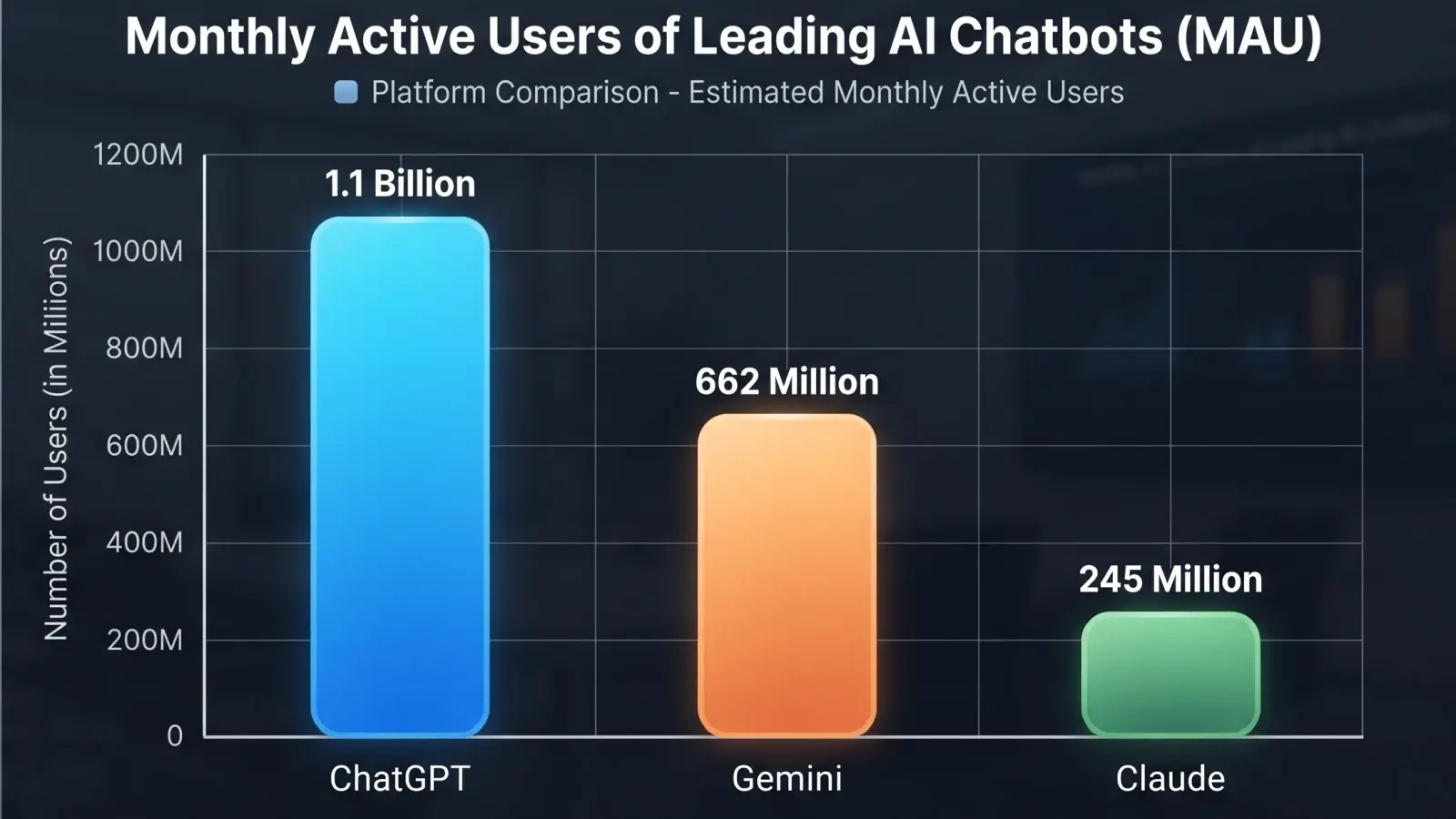
For the first time since its launch, ChatGPT holds less than half the AI assistant market. Gemini and Claude are gaining ground fast. Here is what the numbers say and what it means for everyday AI users.