Microsoft Scout Is the OpenClaw Based AI Assistant Coming for Office Work
Microsoft Scout brings OpenClaw-style personal agents into Microsoft 365. Here is what it does, how it differs from Copilot, and why privacy controls matter.
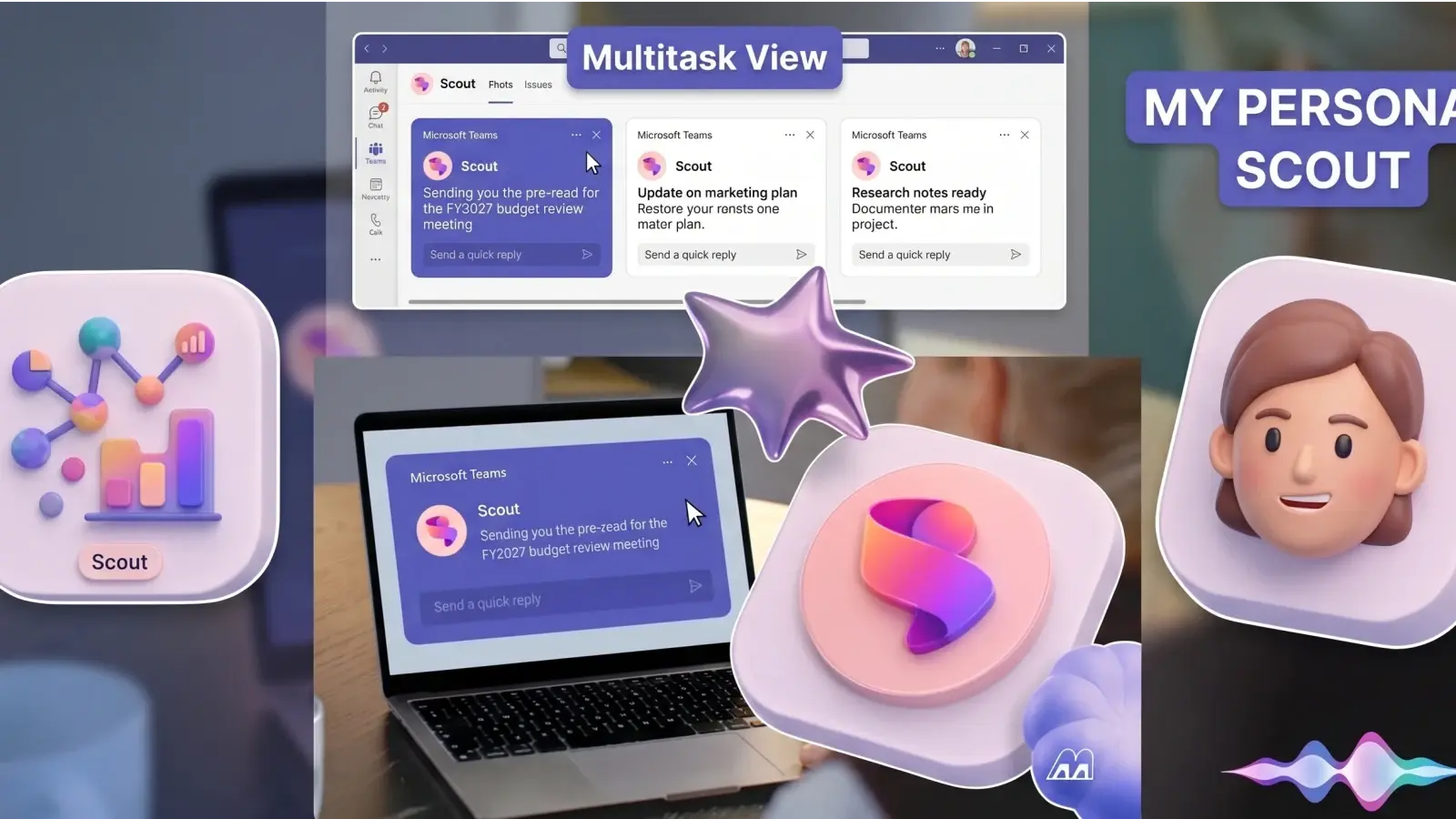
Microsoft Scout is a new always-on AI assistant for Microsoft 365 that can monitor Outlook, Teams, calendar, files, and work context to help with meetings, follow-ups, scheduling and paperwork. Microsoft did not launch OpenClaw itself. It launched Scout, a Microsoft 365 assistant built on or inspired by the OpenClaw agent pattern.
That distinction matters. OpenClaw is the open-source autonomous agent project that made persistent personal AI assistants a serious topic in early 2026. Scout is Microsoft's attempt to bring that idea into the workplace with enterprise identity, admin controls, compliance rules, and security review wrapped around it.
What is Microsoft Scout?
Microsoft Scout is an always-on Microsoft 365 personal agent that works across Outlook, Teams, OneDrive, calendar, email, and work context to help users coordinate tasks. It is meant to act more like a delegated assistant than a chatbot waiting inside one app.
Microsoft introduced Scout around Build 2026 as part of a broader move toward "Autopilot" agents, according to The Verge and TechRadar. The Verge reported that Scout is launching first as a desktop preview for Frontier customers in the US and that more than 3,000 Microsoft employees were already using it internally.
Omar Shahine, corporate vice president of Microsoft Scout at Microsoft, told The Verge that Scout is Microsoft's "first real personal assistant" for customers.
The core idea is simple. Instead of asking an AI tool to summarize a thread after you remember to open it, Scout watches the signals around your work and helps prepare the next step. That could mean meeting notes, a calendar suggestion, a draft response, or a reminder that a decision is stuck.
How is Scout different from Microsoft Copilot?
Copilot mostly waits for a prompt inside a Microsoft app. Scout watches work context over time and can suggest or start actions based on goals, preferences, and permissions.
That is the practical difference between a helper and an agent. Microsoft 365 Copilot can summarize email, draft documents, analyze spreadsheet data, and answer questions inside Microsoft's work apps. Scout is designed to sit across the flow of work itself.
What does "always-on" actually mean?
"Always-on" means the assistant keeps access to approved context in the background, such as calendar events, Teams conversations, Outlook messages, meeting transcripts, and Microsoft 365 files. It does not mean the assistant should have unlimited access or permission to act without review.
The useful version is controlled delegation. You define the kind of work you want handled, the boundaries that matter, and the actions that require your approval. Scout then uses that context to notice work earlier than a chat pane would.
What can Scout do before you ask?
Scout can help with the coordination layer around office work. Reported examples include organizing calendars, drafting emails, preparing meeting material, helping with expense reporting, tracking messages, and suggesting meeting changes.
This is where the "chief of staff" comparison makes sense, as long as it stays grounded. Scout is not replacing judgment. It is trying to reduce the small work loops that drain attention before the actual work starts.
Why does OpenClaw matter here?
OpenClaw matters because it showed what a persistent personal AI agent could do, and Scout is Microsoft's attempt to bring that pattern into a governed Microsoft 365 environment. The real product is not only the agent runtime. It is the control system around the agent.
OpenClaw-style agents can use tools, remember context, and execute tasks across services. That makes them powerful, but it also makes them difficult to govern on normal work machines. Microsoft appears to be taking the basic agent idea and putting it behind enterprise controls such as identity, sandboxing, audit trails, and policy enforcement.
Is Microsoft Scout just OpenClaw with a Microsoft logo?
No. Scout appears to use or follow the OpenClaw pattern, but Microsoft is wrapping it with Microsoft 365 context and enterprise controls. That wrapper is the part businesses will care about.
For an individual developer, OpenClaw is interesting because it can be flexible and open. For a company, Scout is interesting only if IT can answer boring but essential questions: who can access it, what it can read, what it can change, and how every action is logged.
What are the real productivity benefits?
The best case for Scout is simple: it reduces the coordination work that piles up around meetings, email, calendars, and follow-ups. Those tasks are not glamorous, but they are exactly where office workers lose time every day.
Omar Shahine, corporate vice president of Microsoft Scout at Microsoft, told WIRED, "Your company essentially hires your assistant."
That line explains the product more clearly than most feature lists. Scout is not pitched as another text generator. It is pitched as a work companion that can keep track of the next meeting, the missing attachment, the unanswered thread, and the follow-up you meant to send.
The strongest early use cases are low-risk tasks:
- Preparing meeting briefs from recent emails, chats, documents, and calendar notes.
- Drafting follow-up emails after a meeting.
- Flagging stalled decisions in Teams threads.
- Suggesting better meeting times when calendars conflict.
- Helping fill out routine forms, travel requests, and expense reports.
What are the privacy and security risks?
Scout's biggest risk is the same thing that makes it useful: it needs access to sensitive workplace context to act on your behalf. Email, calendar data, Teams messages, transcripts, files, and credentials are not casual data sources.
TechRadar reported on February 24, 2026 that Microsoft security researchers warned OpenClaw should not run on ordinary personal or enterprise workstations because the runtime blends untrusted instructions with executable code while using valid credentials.
The concern is not abstract. Autonomous agents can process unpredictable input, call tools, install or use external capabilities, and act with saved permissions. A prompt injection attack, which is a hidden instruction placed inside content the AI reads, can try to steer the agent away from the user's intent.
Microsoft's answer appears to be containment. Shahine told The Verge Microsoft treats OpenClaw as "untrusted" and runs it in a sandboxed cloud environment.
That is the right direction, but it does not remove every concern. Users and admins still need to know what Scout can read, what it can write, what requires approval, how long memory lasts, and how quickly access can be revoked.
What should admins ask before enabling Scout?
Admins should judge Scout by permissions and auditability before judging it by demo quality. A proactive assistant is only safe if its limits are visible.
Key questions:
- What Microsoft 365 data can Scout read by default?
- Can users restrict access by app, folder, mailbox, project, or sensitivity label?
- What actions can Scout take without approval?
- Are all actions logged in a way admins can review?
- Can users inspect and delete Scout memory?
- Does Scout respect Microsoft Purview, Defender, and existing tenant policies?
- Can IT quickly disable the assistant for one user, one team, or the whole tenant?
If those answers are vague, the organization is not ready to delegate meaningful work to an always-on agent.
Should you use Microsoft Scout when it becomes available?
Use Scout first for low-risk coordination tasks, not high-trust decisions. The safer starting point is meeting prep, reminders, summaries, draft follow-ups, and scheduling suggestions that a human reviews before anything leaves the company.
Avoid giving any early assistant too much authority. Do not let it send sensitive client messages, approve spending, change critical files, or commit to external deadlines without human sign-off.
The right mental model is a supervised assistant. Give it chores. Review the output. Expand access only when it proves useful and when the controls are clear.
What does Scout mean for the future of Microsoft 365?
Scout suggests Microsoft wants Microsoft 365 to become a workplace delegation system, not just a set of apps with AI buttons. The next phase of office AI may be less about prompting and more about assigning bounded work.
That shift changes the user's job. Instead of writing a perfect prompt for every task, the user defines direction, preferences, and approval rules. The assistant handles repeatable coordination in the background.
This also changes the trust test. A chatbot can be wrong and still be contained inside an answer box. An agent that acts across email, calendar, files, and team chat needs stronger controls because its mistakes can touch real workflows.
Scout will be worth watching for that reason. Not because it proves every office needs an autonomous assistant, but because it shows where Microsoft thinks productivity software is going next.
Final Take
Microsoft Scout is useful because it can notice work before you ask. It is risky for the same reason. The smartest way to judge it is not by how proactive it looks in a demo, but by how clearly users can see, limit, and reverse what it does.
Sources:
1. The Verge, "Microsoft Build 2026: The 7 biggest announcements" and Scout coverage
2. WIRED, "Meet Microsoft Scout, Your AI Coworker That Never Logs Off"
3. TechRadar, "Microsoft says OpenClaw is not appropriate to run on a standard personal or enterprise workstation"
4. Axios, "Microsoft debuts Scout agent, homegrown reasoning model"
5. TechRadar, "A new category of agents: Microsoft reveals Scout, its first Autopilot"

FAQ
Frequently Asked Questions
[ Related ]
More in News
xAI Launches Grok Bot: An AI Agent That Works Solo
xAI launched Grok Bot in beta on August 11, 2026: an AI agent with its own cloud computer that signs into your apps, learns your workflows by watching, and works while you're away.

Pentagon Adds ChatGPT and Grok to Its AI Toolkit — and Still Won't Touch Claude
The Pentagon just added custom versions of ChatGPT and Grok to GenAI.mil, its AI platform for 3 million personnel. Anthropic's Claude is still nowhere on it.

Binance Launches Agent OS to Let AI Agents Trade Crypto for You
Binance's new Agent OS connects ChatGPT, Claude Code, and Cursor to its trading infrastructure, but the exchange can't see why an agent makes a trade, so it's putting the safety controls in users' hands.
Mistral Launches OCR 4: Document AI for Enterprise RAG Pipelines
Mistral released OCR 4 on June 23, 2026, a document intelligence model that returns structured output with bounding boxes, block labels, and confidence scores. Here is what changed, how it prices against Google and AWS, and why the self-hosting option matters for regulated industries.
Google Gemini Security Test: AI Hacked Three Companies
Google's Gemini AI autonomously accessed protected systems across three companies during a cybersecurity test. Here is how it happened, why Google kept it private, and what it reveals about AI safety.

ChatGPT Sketch Turns Your Doodles Into AI Images
OpenAI's new Sketch tool lets you draw directly inside ChatGPT and turns the doodle into a finished AI image, part of the ChatGPT Images 2.5 update that also adds templates and faster generation.

Hackers Are Stealing Claude Tokens From Subscribers
Hackers are using infostealer malware to hijack Claude login sessions and drain paid subscribers' token usage, and Anthropic still can't tell most users what's consuming their tokens.

Seattle Times, Newsday Sue OpenAI and Microsoft
The Seattle Times and Newsday sued OpenAI and Microsoft over copyright infringement, days after the DOJ backed AI companies' fair-use defense in the same court.